At 5 a.m., a sprinkler controller has a small but consequential choice: run the schedule, or wait because rain is on the way?
Every smart irrigation brand has an answer. The useful questions are what weather information it uses, how it turns that information into a watering decision, how much flexibility you get, and what the feature costs after you buy the controller.
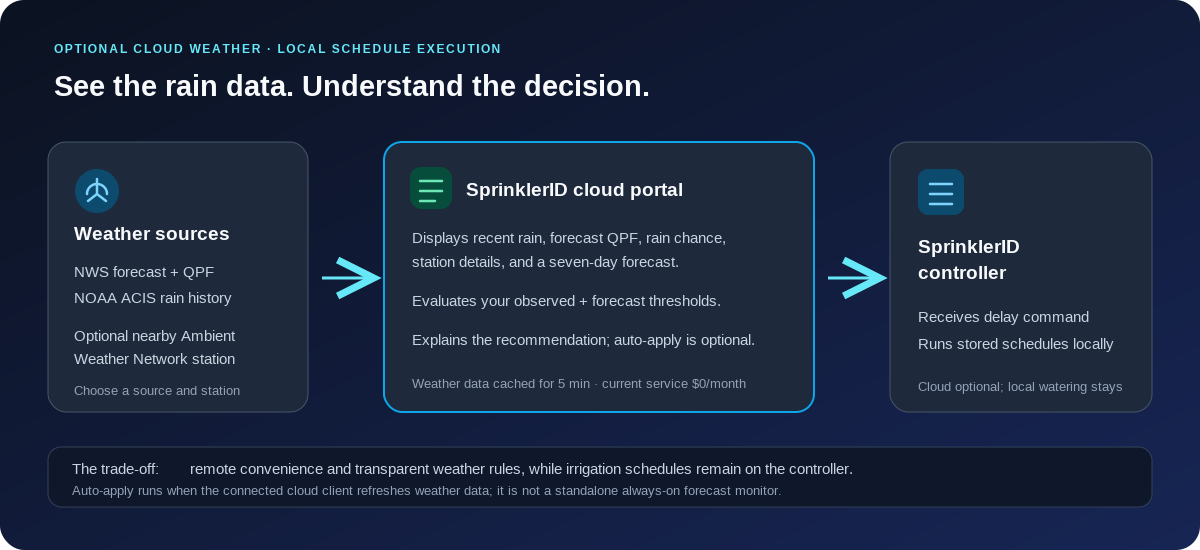
SprinklerID’s approach starts with a choice of weather source—National Weather Service and NOAA data, a nearby Ambient Weather station, or Home Assistant—and lets you tune the rain and forecast thresholds yourself. The schedule runs on the controller locally; the optional cloud service can recommend or apply a rain delay. Its weather sources are included with the service, with no extra weather-feature charge.
What you get from the weather integration
With SprinklerID, the official NWS and NOAA ACIS option combines forecasts, station observations, and historical precipitation. The weather page shows observed rain, forecast precipitation, rain probability, a seven-day forecast, and the source behind the data. If a personal weather station is a better fit for your property, select a nearby Ambient Weather Network station or enter its MAC address. Home Assistant is available for people who already manage local sensors and automations there.
The Rain Delay panel lets you adjust observed-rain thresholds over 24 and 48 hours, forecast-rain thresholds over those windows, rain probability, and the length of a standard or heavy-rain delay. Auto-apply is optional; you can review recommendations and apply them yourself. This gives the homeowner a say in what “enough rain” means for a particular yard.
The price of weather—and the controller
Core weather features are often included in the product price. Rachio’s core Weather Intelligence has no monthly fee, and B-hyve’s WeatherSense delays are part of its app. Hydrawise’s Home plan is free, while its expanded station access is part of a paid tier with no public price listed. Rain Bird includes automatic seasonal adjustment in the ST8 product, and OpenSprinkler’s local weather control does not require a cloud subscription.
So the clearest cost comparison is the complete package: controller price, any weather-related add-on or plan, and the weather capabilities included. Manufacturer-listed prices below were checked November 20, 2026 and can change; zone counts and hardware differ, so they are context rather than a perfectly like-for-like quote.
| Product | Listed controller price | Weather features and recurring cost |
|---|---|---|
| SprinklerID | $84.99 for the 10-zone controller | NWS/NOAA, Ambient Weather, or Home Assistant; adjustable rain-delay rules; included with cloud service at no added weather charge |
| Rachio 3 | $199.99 for 8 zones; $249.99 for 16 | Rain, freeze, wind, and saturation skips plus seasonal adjustment; core weather features have no monthly fee. Optional Heat Wave Boost is $29.99 once per controller. |
| Hunter Hydrawise | Pricing varies by controller and reseller | Weather-triggered watering and rainfall monitoring; Home plan is free. Enthusiast expands hyperlocal station access; public price not listed. |
| Orbit B-hyve | $164.69 for 12 stations | Adjustable rain, wind, and freeze delays plus weather-informed Smart Watering; Orbit lists no separate weather charge. |
| Rain Bird ST8 | Pricing varies by retailer | Seasonal adjustment informed by local weather, temperature, and humidity, plus rain-delay/sensor support; no separate weather plan listed. |
| OpenSprinkler | $130–$200 depending on model | Weather-based run-time adjustment and local operation; a cloud subscription is not required for local control. |
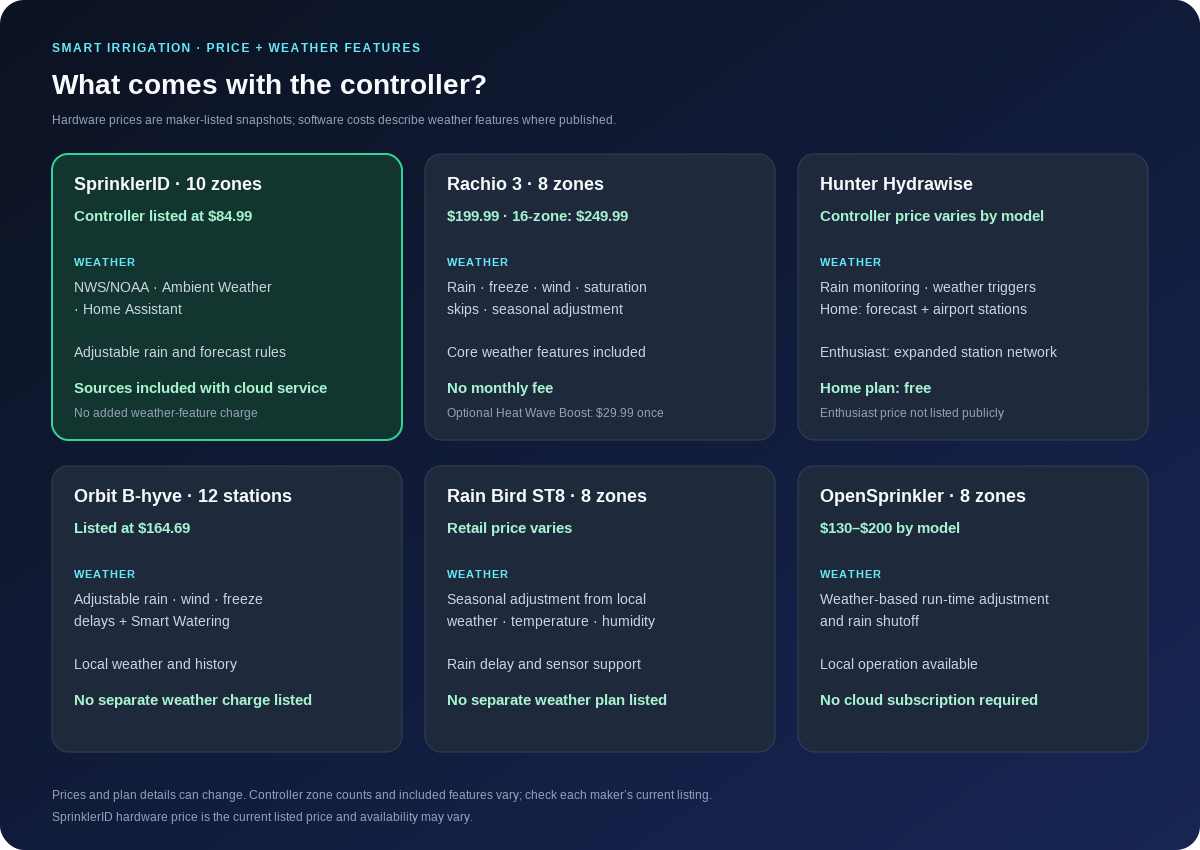
SprinklerID’s appeal is the combination: a lower listed entry price than several familiar Wi-Fi controllers, multiple weather-source choices, and settings that are not hidden behind a paid weather tier. That is useful if you want a simple forecast-based delay today, and still want room to choose a nearby station or connect your own Home Assistant sensors later. (The current product page lists the controller at $84.99 and notes that stock can vary.)
Performance you can see and reliability you can plan around
Weather integrations are only as useful as the information they receive and the rules they apply. No controller can make a forecast certain. SprinklerID makes the inputs visible: the selected source, observed totals, forecast amounts, and thresholds that triggered a recommendation. The portal refreshes weather about every five minutes while a controller is selected, and you can request a manual refresh.
There is also a practical reliability detail: the cloud can send a weather decision, but the saved watering schedule runs on the controller. If the connection drops, new cloud weather updates and remote access pause; the controller continues the schedule already stored on it. That local execution is a useful design choice for anyone who wants cloud convenience without making an internet connection part of every scheduled watering run.
It also leaves room to grow. New sources, clearer reporting, and more useful adjustment options can be added to the cloud experience over time, while the controller continues doing its basic job locally. The point is to keep giving homeowners useful choices rather than locking them into one weather feed or one fixed idea of how rain should affect a schedule.
A note for Home Assistant users
Home Assistant is also a supported source. If its sensors and automations should decide rain delays, choose Controller-Pushed. If NWS or Ambient Weather is selected in the cloud portal, that source handles the delay instead. The integration can still send local telemetry without two systems competing to change the same setting.
The weather may be unpredictable. The price, source, and rules behind your sprinkler’s decision should be easy to understand—and easy to change.
Product details and pricing sources
- SprinklerID controller and current listed price
- SprinklerID cloud portal
- SprinklerID weather and controller documentation
- Rachio 3 pricing and features
- Rachio Weather Intelligence
- Rachio premium software features
- Hydrawise plan details
- Orbit B-hyve controller pricing and features
- B-hyve WeatherSense thresholds
- Rain Bird ST8 features
- OpenSprinkler pricing and weather features